
Streamlining the Event Attendee Workflow
Veeva Vault CRM Events Management’s attendee management features simplify the event attendee workflow while staying compliant. See the latest in this quick guide.
Overview
Veeva Vault CRM Events Management makes managing event attendees easier and more efficient throughout the event lifecycle.
A memorable attendee experience at an educational event can go a long way in helping healthcare professionals (HCPs) broaden their knowledge about new treatments. But if your teams are spending most of their time on manually keeping track of attendees in the background, it can take away from the time they need to deliver the perfect front-of-house experience.
Events Management saves your teams valuable time by reducing the admin work required to manage your attendees. A set of specialized attendee management features give the entire events team the tools to collect and collate attendee information into a comprehensive view of attendee status, eliminating the manual data loading and matching required to move attendee data between systems.
Using attendee management features, event organizers can:
- Search for and invite attendees directly from Veeva Vault CRM
- Generate a digital registration form to collect attendee information
- Allow attendees to sign in digitally via QR code or custom links
- Reconcile attendees to HCP records for faster closeout and compliance reporting
All invitee, registrant, and attendee data are stored in Vault CRM to give a complete picture of the HCP journey across engagement channels.
Benefits of Attendee Management
For Event Organizers
- Track the end-to-end journey of an HCP from planning to expenses in one place
- Manage event content specific to attendees, such as invitations and registration forms, directly from Vault CRM
- Close out events with a simplified process and user interface
For IT and Compliance
- Prevent noncompliance with attendee-specific business rules
- Create event-specific registration forms with no custom development
- Maintain a unified view of the customer by reconciling attendee records to existing accounts
Tips & Tricks
Finding The Right People
When planning an event, event organizers in Events Management start with full access to the accounts assigned to them in Vault CRM. Account lists and views help organizers browse through their customers intuitively, while search and filter functionality allows them to pinpoint just who they need.
Sometimes, an attendee that an organizer wants to invite is outside of their assigned territory. In these cases, organizers can trigger an outside-of-territory search, which allows them to invite any HCP in the broader customer universe to their event.
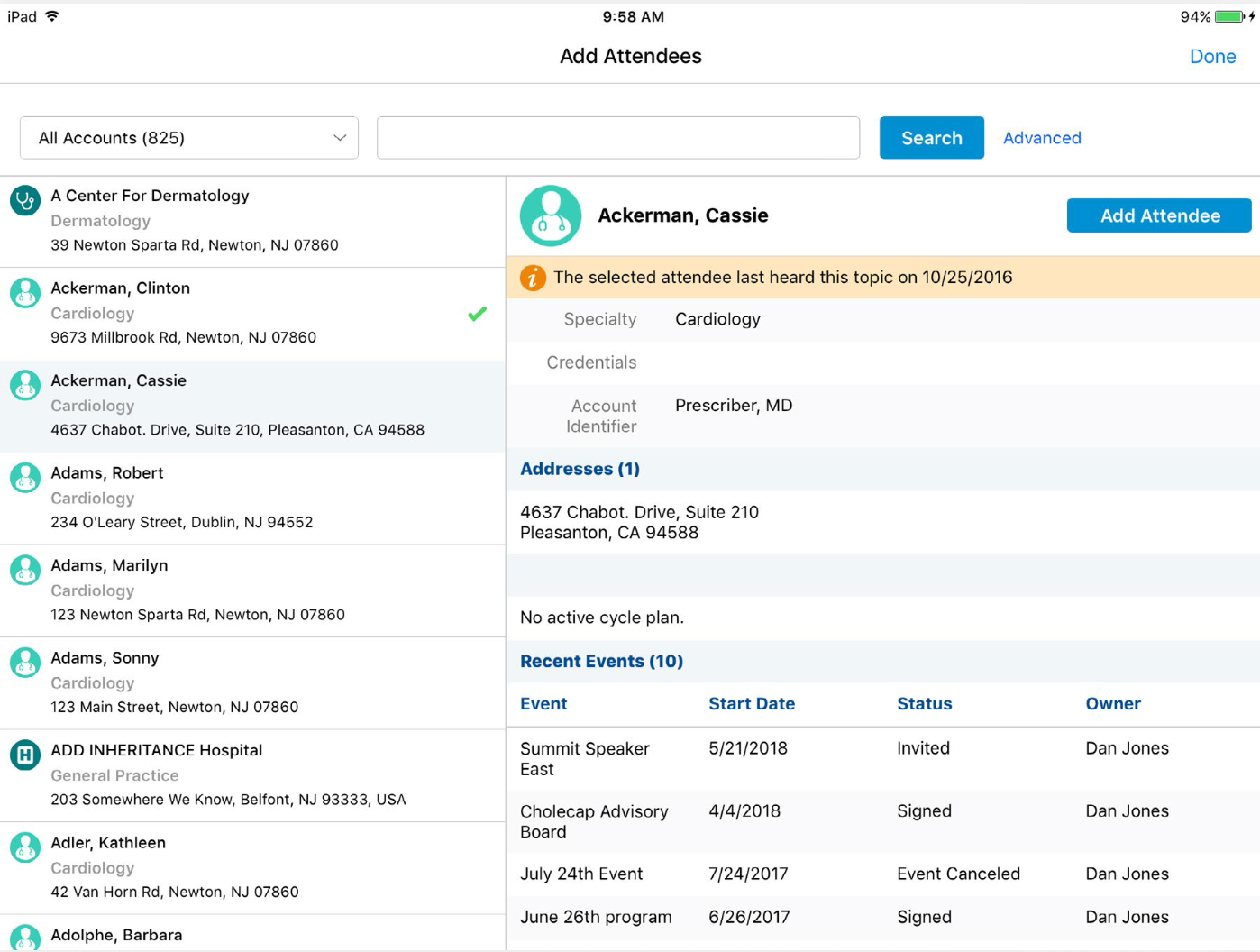
The attendee search interface in Events Management
Staying within Regulations
Want to make sure that invitees haven’t attended too many events? Or that organizers haven’t invited HCPs with license restrictions? Events Management’s Business Rules Engine keeps you compliant by automatically checking if HCP attendees or invitees match specific criteria.
The attendance restriction rule within the Business Rules Engine monitors whether an invitee faces any restrictions against an event based on past attendance or meals taken. There are five subtypes of attendance limit rules:
- Per Attendee: checks for the number of events of each kind an attendee has been invited to within a defined time range
- Cross-Event Per Attendee: checks for the number of events an attendee has been invited to within a defined time range across all event types
- Meal Opt-In: checks whether an attendee can be added to an event in a defined time range based on the number of meals the attendee has taken
- Cross-Event Meal Opt-In: checks whether the attendee can be added to an event in a defined time range based on the number of meals the attendee has taken across all event types
- Per Event: checks that the number of attendees added to an event is within a certain range
Another type of attendee rule in the Business Rule Engine is the attendee restricted product rule, which looks at whether there are any products that an HCP cannot receive information about at the account level. If an event details one of the HCP’s restricted products, this rule will prevent the HCP from being added as an event attendee.
Simplifying Registration Forms
Events Management eliminates the need to develop custom registration portals by allowing event organizers to generate digital registration forms for each event automatically.
Each digital form is assigned a unique link that event organizers can send to invitees using any text channel or a QR code. These forms can also be delivered to invitees using Veeva Vault CRM Approved Email and accessed on any device with a web browser so invitees can register from anywhere at any time.
The registration form accommodates two types of registration: open registrations for events where anybody can register, and targeted registrations that are limited to invitees on a predetermined list.
Home office can configure the fields they want each registrant to fill out and define whether fields are required or optional. The form also supports brand and company logos and disclaimers for compliance purposes.
All registrant information is saved in Vault CRM and will undergo a reconciliation process to match the information to existing accounts.
The same business rules and approval processes that are configured on the Attendee object will also trigger for any registrants collected through the digital form.
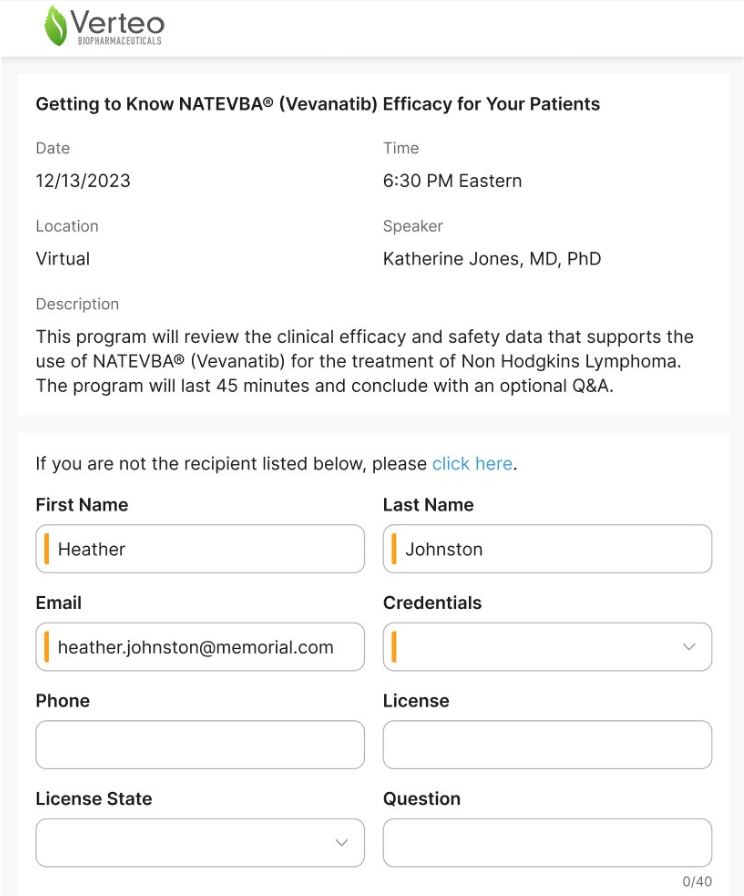
The invitee view of a digital registration form
Signing in Using QR Codes
Managing paper sign-in sheets or a digital sign-in device can be difficult for both event organizers and attendees.
Organizers struggle to track them, while attendees often face crowding and frustration when they have to line up to sign in. Events Management solves this problem by allowing attendees to sign in on their own devices through a simple QR code scan.
Organizers can display the QR code from a mobile device or printout, or even send the QR code to attendees via Approved Email. Once an attendee scans the code, the sign-in form opens on their device, where they can input their information.
Event organizers can monitor sign-ins from their own devices in real time to check on attendance and assist anyone who has trouble signing in.
Reconciling Walk-In Attendees
Events Management ensures that walk-in attendees are recorded accurately and matched to known HCP profiles with a streamlined attendee reconciliation interface. Event organizers can match attendee records to known accounts right in Vault CRM using an intuitive search interface, which eliminates the need for manual data extractions and loads. For organizations using Veeva Network, the search for matching accounts extends beyond assigned territories, encompassing the broader customer universe.
If an event organizer can’t find a matching profile for a walk-in attendee, the reconciliation interface includes an option to create a new account from the attendee’s information. This approach adheres to the existing protocols in your org for new account creation, including any necessary data change requests.
Once a new account is created, the attendee's information is automatically reconciled to that account and their event attendance is logged within their interaction history. This provides a complete record of their engagement with your organization.

The walk-in attendee reconciliation interface
Ready to try out these attendee management features? The following CRM Help documentation pages can help you get started.
Resources
- Attendee Searching and Filtering
- Business Rules Engine
- Digital Registration Form
- QR Codes for Signing In
- Walk-In Attendee Reconciliation