
Veeva EDC - Local Labs Module
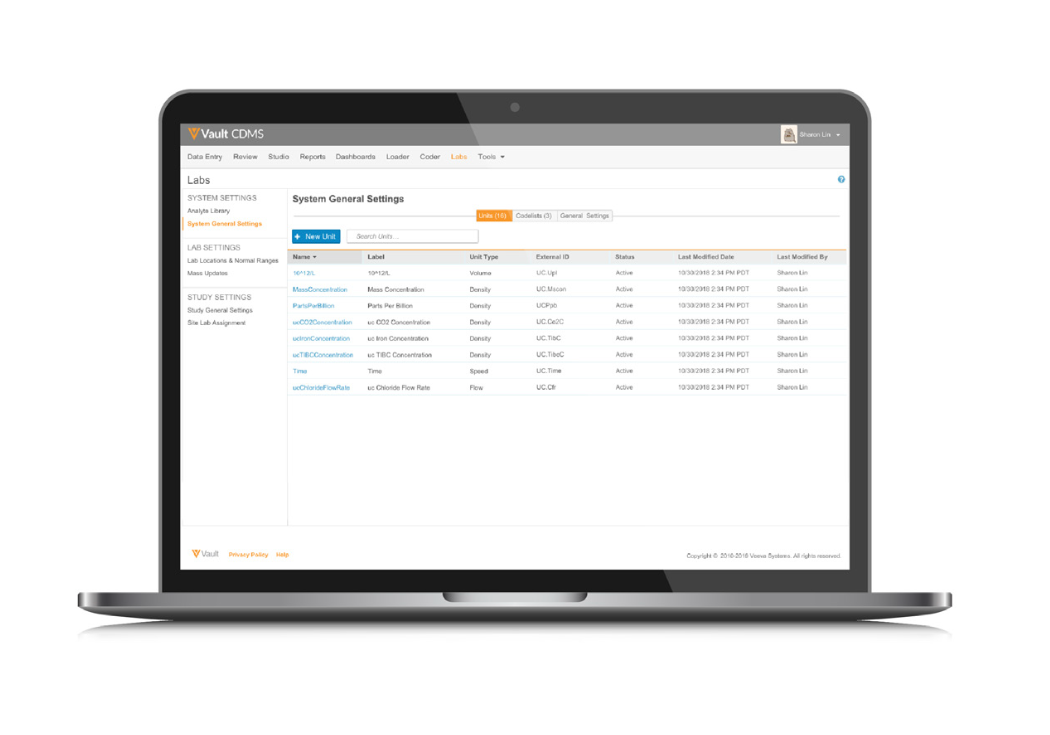
Managing Reference Ranges and Units Across All Your Studies
Laboratory reference ranges for any test or analyte are unique to each lab. Working with one or more labs at each site creates a burden on the sites and data managers to collect and manage the reference ranges and correlated units for every study. Veeva EDC lifts the burden on data managers to standardize the data and units across all studies for reporting and analysis purposes.
Streamlining Work with Local Lab Data
Veeva EDC optimizes the site experience and data quality by allowing for configuration of a master list of units and range values for use across all your studies. Units of measure and laboratory normals are managed centrally in Veeva EDC. When entering results, sites select the lab location, and the correct units and reference ranges are automatically loaded (insert period) Sites only enter the collection date, time, and lab results - nothing else is required.
“We got a round of applause at an investigator meeting for leveraging this solution.”
Senior VP, Head of Global Clinical Trial Operations, Top 20 Biopharma
Business Benefits
-
Minimizes Data Entry
- Sites only enter the collection date, time (if required), and lab results.
- Selecting the lab location auto-populates range values and associated units.
-
Maximizes Data Quality
- Manage lab reference ranges in one place for the entire organization. Ranges entered in the master list are available for every study.
- Updated range values are immediately available, minimizing the risk of making decisions on outdated information.
“Before Veeva, about 5-10% of our data queries were on local labs normal ranges because there's so much data and so much room for error when you have a lot of manual steps.”
Senior VP, Head of Global Clinical Trial Operations, Top 20 Biopharma
Features
-
Clean, Intuitive Interface
The modern UI is easy to navigate with little training needed. The local lab data is unified with Veeva EDC administration, workflows, and case report forms. -
Centralized Tracking of Reference Ranges
Enter lab reference range information once and share it across all of your studies and sites. (remove case report forms). -
Data-driven Reference Range Selection /strong>
Patient demographic information, such as age, gender, and fasting status, determines the auto-population of the reference range data for that specific patient, laboratory, and analyte. -
Manual Override
If authorized, sites may override the auto-populated range values for a particular analyte. Both sets of values are displayed. -
Reference Range Effective Dates
Effective dates for lab reference ranges ensure the correct ranges display for the given collection date. -
Pre-defined Units
The appropriate units are automatically loaded once sites designate the lab. Configuration is in your hands with the option to remove dropdown selections. -
Background Unit Conversions
Veeva EDC maintains a library of unit conversion ratios and generates standardized results and units to accompany the original results and units in data extractions. -
Visual Indicators
Visual icons indicate when results are outside of reference ranges. Sites can easily see which results need review for clinical significance. -
Rapid Setup
Upload lab locations and reference ranges from a spreadsheet template for easy deployment.
Changes to Lab Reference Ranges
Lab reference ranges will change due to a new testing method, a new analyzer, or a software update. With most EDCs, a site updates the normal range for an individual study, and every study and site using that lab needs to make the same update. Such a fragmented process introduces delays and increases the likelihood of error.
With Veeva EDC, the sponsor or CRO will update the lab reference range, including the effective date provided by the lab, and the new information is instantly available across all your studies. Veeva EDC generates a discrepancy report and flags impacted forms, based on the effective date.
Learn more at veeva.com/products/veeva-edc/