Innovation Guides
Integrating Content into Your Event Workflow
Veeva Vault CRM Events Management’s content management capabilities simplify content creation and delivery by integrating event materials directly into an organizer’s event workflow.
Veeva Vault CRM Events Management’s content management capabilities simplify content creation and delivery by integrating event materials directly into an organizer’s event workflow.
As healthcare professional (HCP) engagement expands into more channels, event organizers must manage more content across more mediums than ever before. For a single event, an organizer might have to prepare email invitations, digital sign-in forms, physical signage, interactive speaker decks, paper handouts, online surveys, and more.
Events Management helps organizers manage event content of all types from a single, unified interface—the same one they use for event execution. Content sending is built into the execution flow, with business rules to ensure organizers use the right types of content for each event.
An integration to Veeva PromoMats and Veeva MedComms pulls MLR-approved content directly into Events Management, eliminating the errors and redundancy from manual content loads. An embedded email template designer in Vault helps home office users create custom email templates with a simple point-and-click interface.
Benefits of Content Management
For Event Organizers
- Send emails, access print templates, and display virtual event content directly from Events Management
- Track email status and take necessary follow-up actions
For Marketing
- Create event materials seamlessly and quickly using the embedded BEE Editor in Veeva PromoMats and Veeva MedComms
- Measure content usage through content reporting in Veeva Vault CRM, Veeva PromoMats, and Veeva MedComms
For IT and Compliance
- Cut down on manual content loads with an integration from Veeva PromoMats and Veeva MedComms that automatically pulls content into the right events
- Enforce mandatory event materials for events through business rules
Tips and Tricks
Moving Content from Review to Execution
The handoff between the end of the content approval process and the use of content in an event is often time-consuming for operations teams. The Vault to Events Management integration removes many of the manual steps involved in this handoff, ensuring your print and email content flows where it needs to be automatic.
Alignment rules defined in Veeva PromoMats or Veeva MedComms match content to the right event types, and the integration then loads the content into the corresponding event records in Events Management. New events that match the criteria in the alignment rules will also have the correct content pieces attached to them.
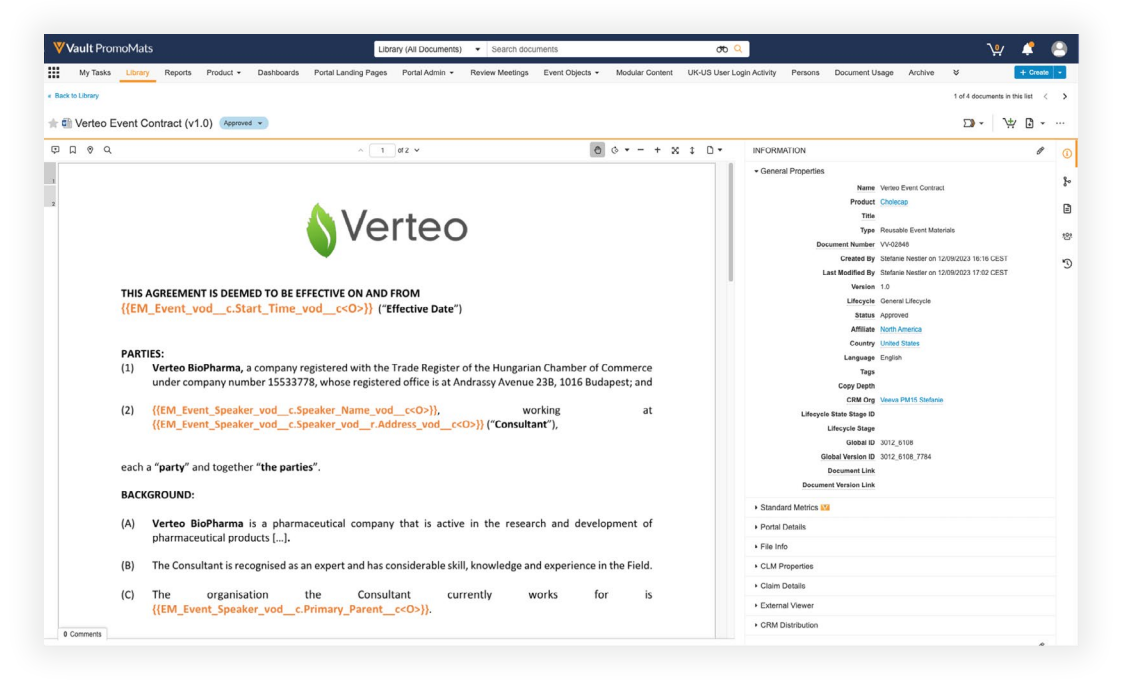
Veeva PromoMats integration download
The integration also covers content updates and deletions. If a piece of content gets updated in Vault, the integration will automatically update all versions of the content in Events Management to match the latest edition. Deletion of content from Vault will also remove all versions of the content from the Events Management side.
Sending Emails from the Event Workflow
Field teams are busy enough as is, and their inboxes show it. Why force them to dig through their other work emails to keep track of their event-specific threads?
Events Management lets the field send event-related emails using Veeva Vault CRM Approved Email from the event workflow. Email templates can be loaded into Events Management from Veeva PromoMats or Veeva MedComms to ensure all messaging has been approved through MLR. At the same time, contact lists are generated from the event attendees and invitees selected by the event organizer.
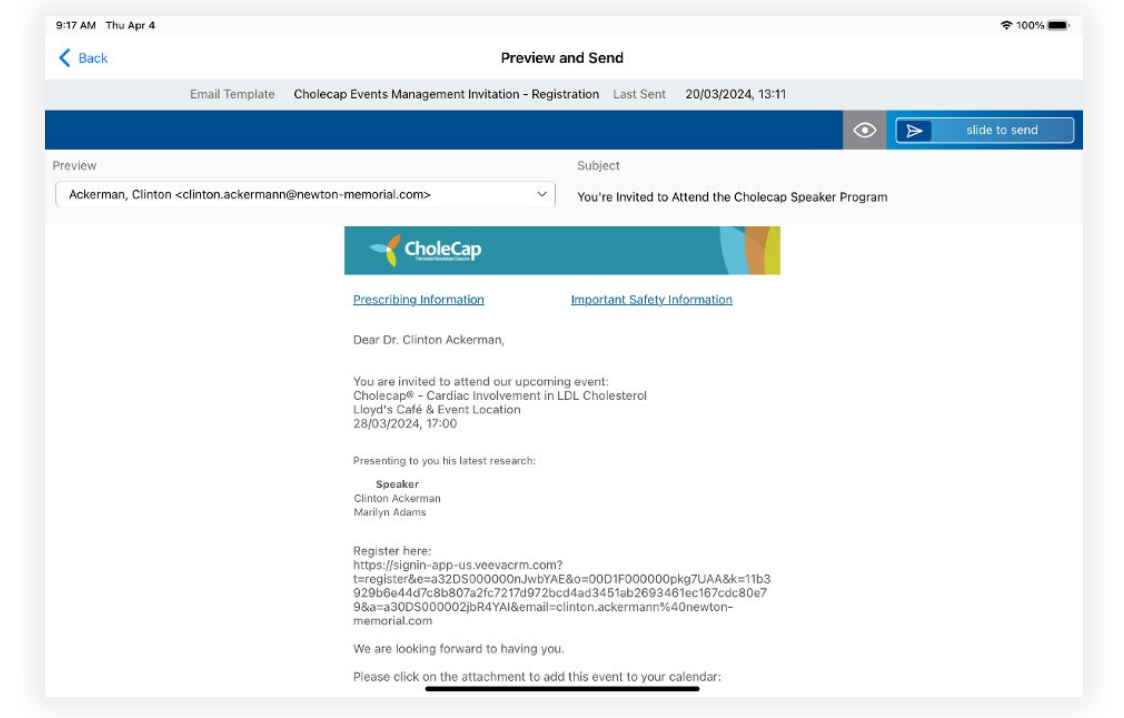
Approved Email template
After an email is sent, Approved Email tracks opens and clicks for both performance and compliance purposes. This helps your event organizers keep track of their interaction history while giving home office teams helpful feedback to help them make their emails even better.
Creating Email Templates on the Fly
Almost every event today uses email content. If you’re custom coding each template, the costs can quickly add up. With Events Management, your teams can easily access a codeless editor for email templates to help you get event emails into the field faster and at scale.
Events Management supports email templates created in BEE Editor, a drag-and-drop tool for creating email templates in Veeva PromoMats and Veeva MedComms. Using the editor, home office administrators or content managers can design custom email templates in minutes without code and even convert print materials into emails.
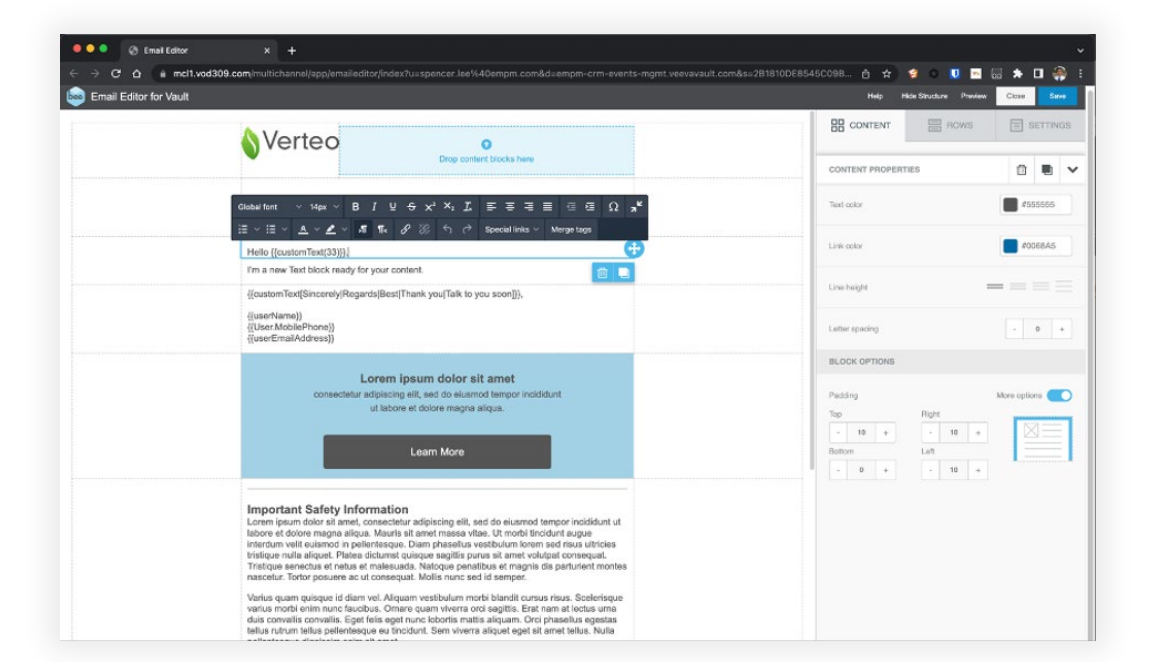
The BEE Editor
BEE Editor can also personalize emails with tokens that dynamically update based on event information like an attendee’s name, a venue’s address, or a seminar’s title. These tokens will automatically populate with the event information stored in Vault CRM before an email is sent, eliminating the need for email merges.
Reminding Event Organizers to Use Content
The Business Rules Engine in Events Management lets the home office set up guardrails to make sure organizers follow all the compliance and process requirements for an event—including content.
One type of business rule that the engine can enforce is the Required Event Material Rule, which reminds organizers to add materials to an Event record during certain stages in the event lifecycle. For example, this rule can stop an organizer from submitting an event for approval if they don’t have a speaker outline and an agenda, or even prevent an event from being closed out if they don’t have the speaker’s deck.
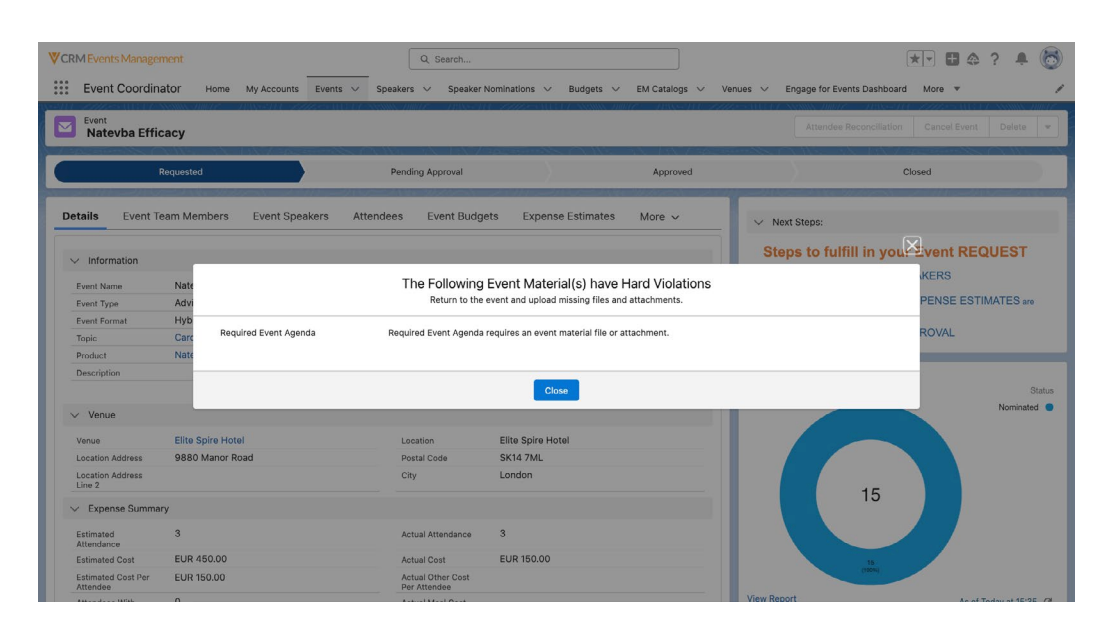
Required Event Material Rule
Resources
Ready to simplify your event content processes? These documentation articles can help you get started:
- Vault to Events Management Integration
Integrating Events Management with Veeva Vault - CRM Approved Email for Events Management
Using Approved Email for Events Management - BEE Editor
Using the BEE Email Template Editor - Required Event Materials Business Rules
Required Event Material Rules
Get the latest on new and upcoming features to simplify your event lifecycle in the Veeva Connect Events Management Community.